Game Glitch: The Pixel-Perfect Font for Bold Designs
There’s a certain energy that comes with classic video games—the bright colors, the chunky pixels, the unmistakable vibe of an 8-bit adventure. If you’ve been searching for a way to inject that retro excitement into your modern projects, the Game Glitch typeface might be the missing piece of the puzzle. It is a fun, pixelated font that captures the essence of gaming culture while remaining a versatile tool for professional design. Whether you are a seasoned graphic designer, a small business owner looking to spice up your branding, or a content creator building a new aesthetic, understanding how to leverage a display font like this can significantly elevate your visual communication.
Retro Charm Meets Modern Technology
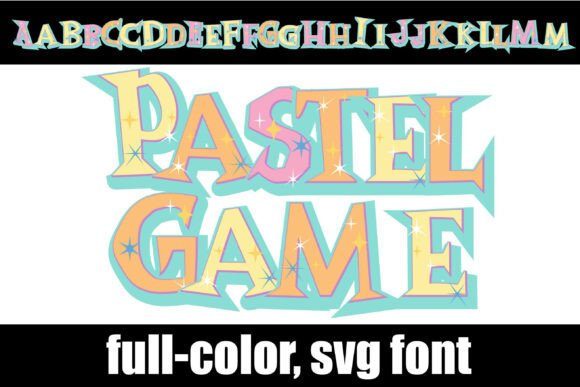
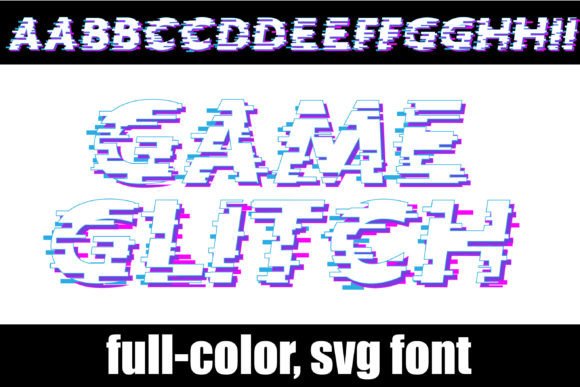
At first glance, Game Glitch feels like a nostalgic trip back to the arcade, but under the hood, it is a piece of modern typography engineering. As an OpenType full-color (SVG) font, it stands apart from standard typefaces. Unlike a regular serif font or sans serif font that relies on a single color (usually black) defined by the user, a color font comes pre-loaded with color data. This means the "Game Glitch" font features a full spectrum of hues embedded directly into the vector file. You get the pixelated texture along with the vibrant color palette without needing to manually add gradients or outlines in your design software.
However, working with this technology requires a basic understanding of compatibility. It is important to note that full-color fonts will show as black in non-compatible programs. Because the color information is complex, older or simpler software cannot interpret it, defaulting to a solid black silhouette. You will know if your program can support color fonts when you type on the document and see them in color. Currently, professional environments like Adobe products (Photoshop, Illustrator), Silhouette Studio, Quark, and Inkscape support these advanced design assets. If you are a Mac user, installation happens via FontBook, while Windows users can utilize their preferred font manager or Control Panel. They often show as black when choosing the font in the preview window, so don't panic if the dropdown menu looks monochromatic; the magic happens once you type it out on the canvas.
Creative Applications for Branding and Marketing
The versatility of a creative font like Game Glitch extends far beyond personal art projects. For brand identity, typography sets the tone. If your brand targets the gaming community, tech enthusiasts, or a younger demographic that appreciates retro aesthetics, this pixelated style can become a cornerstone of your visual language. It is an excellent choice for logo design, particularly for streamers, tech startups, or entertainment venues. The bold, blocky nature of pixel fonts ensures high visibility, making it a strong contender for packaging design where shelf appeal is critical.
Consider the impact on your social media graphics. In a crowded feed, a standard script font or handwritten font might get lost, but a vibrant, full-color SVG font demands attention. It is perfect for announcing sales, creating YouTube thumbnails, or designing Instagram Story headers. For those in the e-commerce space, this font works beautifully for merchandise. Imagine t-shirts, mugs, or stickers featuring phrases written in Game Glitch; the embedded colors ensure the design remains consistent across different print mediums.
Furthermore, don't overlook the potential for print materials and editorial design. While it is certainly a display font meant for impact rather than long-form reading, it shines in specific contexts. Use it for posters, invitations to gaming tournaments, or headers in a digital newsletter. Even in web design, it can be used sparingly for call-to-action buttons or hero section titles to break the monotony of standard web-safe fonts.
Practical Tips for Implementation
Integrating a premium font like this into your workflow requires a bit of strategy to ensure professional presentation. Because the font is vector-based, it can be scaled to any size without losing quality, which is crucial for digital products and large-format printing. However, readability is key. Pixel fonts are best used for headlines, titles, and short bursts of text. Avoid using Game Glitch for body copy or long paragraphs, as the "pixel" structure can strain the eyes over extended reading sessions. It is designed to be a visual accent, not a workhorse for body text.
When it comes to font pairing, contrast is your friend. To maintain visual consistency and readability, pair the Game Glitch display font with a clean, neutral sans serif font for your supporting text. A geometric sans serif or a simple grotesque typeface will complement the retro vibe without competing for attention. This balance ensures your message is communicated clearly while the design retains its personality.
Finally, always consider your commercial licensing. If you are using the font for client work, merchandise, or marketing assets, ensure you have the appropriate license. Most design assets come with specific terms regarding how many computers can install the font and whether it can be used in products for sale. Checking these details upfront protects your business and ensures you are respecting the intellectual property of the font creator.
Ultimately, Game Glitch is more than just a set of letters; it is a design asset that brings a specific mood to your projects. By understanding its technical capabilities as a full-color SVG font and applying it thoughtfully to your branding and marketing materials, you can create visuals that are not only eye-catching but also strategically sound. Whether you are designing a logo, packaging a product, or crafting a social media campaign, this font offers a unique way to stand out in a pixelated world.